15 Common Arabic Typing Mistakes and How to Fix Them
From Hamza confusion to missing dots — the most frequent Arabic typing errors and their solutions.
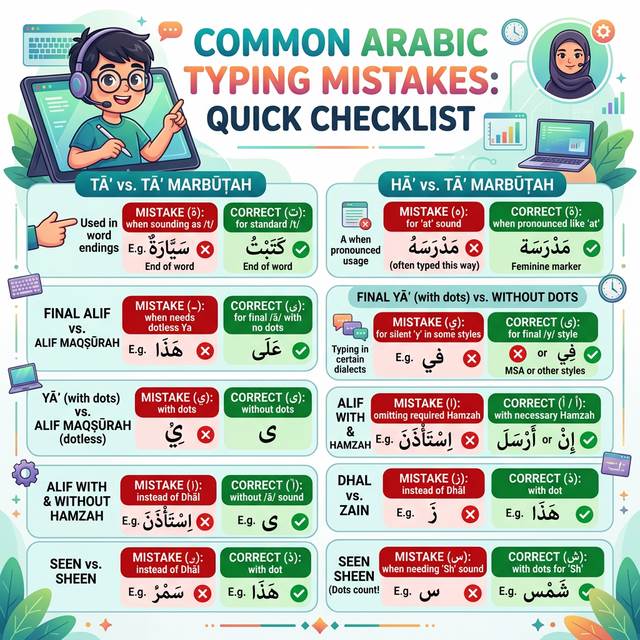
Even experienced Arabic typists make common mistakes. Some errors are harmless (a missing dot here, an informal spelling there), while others fundamentally change word meaning. This guide identifies the 15 most common Arabic typing mistakes and shows you exactly how to fix each one.
1. Hamza (ء) Confusion — The #1 Mistake
Hamza is the most commonly mistyped Arabic character. Many people use "أ" everywhere, but Hamza has 5 different forms depending on context:
| Form | Character | When to Use |
|---|---|---|
| Alef with Hamza above | أ | When preceded by Fatha or at word beginning |
| Alef with Hamza below | إ | When preceded by Kasra |
| Alef with Madda | آ | Hamza + Alef combination |
| Waw with Hamza | ؤ | When preceded by Damma |
| Ya with Hamza (Hamzaty) | ئ | When preceded by Kasra (strongest vowel) |
| Standalone Hamza | ء | In the middle/end of words with no connecting seat |
Wrong: الاسره Correct: الأسرة
2. Confusing Ta Marbuta (ة) with Ha (ه)
Ta Marbuta (ة) is a special letter that looks like Ha (ه) with two dots. It indicates a feminine noun ending. Confusing them changes the meaning:
- مدرسه ❌ (meaningless) vs مدرسة ✓ (school)
- جامعه ❌ vs جامعة ✓ (university)
3. Alef Maqsura (ى) vs. Ya (ي)
These two letters look nearly identical in some fonts. Alef Maqsura (ى) has no dots and appears at the end of words. Ya (ي) has two dots below and can appear anywhere.
- علي = Ali (name with Ya) vs على = "on/upon" (with Alef Maqsura)
4. Missing the Dots Entirely
In social media and informal typing, some users drop dots entirely (a practice called "dot dropping"). While understood informally, this is incorrect in any formal context and can cause serious ambiguity.
Example: ﻞﺡﻢ (missing dots) vs لحم (correct: "meat")
5. Waw vs Alef Confusion
Beginners sometimes confuse Waw (و) and Alef (ا) in typing, especially at word endings. Both are long vowels but represent different sounds (u/w vs. a).
6. Using Alef Instead of Alef Wasla (ٱ)
In Quranic typing, the word "Allah" (ٱللَّه) uses Alef Wasla (ٱ), not regular Alef (ا). Similarly, many Quranic words use Alef Wasla for the hamzat al-wasl. Using regular Alef here is technically incorrect in Quranic contexts.
7. Lam-Alef Connection (لا vs ل + ا)
When Lam (ل) is followed by Alef (ا), they MUST form the ligature "لا". Most keyboard software handles this automatically, but some systems require manual handling. If your لا is showing as two separate characters, there may be a shaping/rendering issue with your font.
8. Shadda Positioning
Shadda (ّ) indicates a doubled consonant. A common mistake is placing it on the wrong letter of a word, changing the meaning entirely.
Example: مُدًّرس (wrong Shadda position) vs مُدَرِّس (correct: "teacher")
9. Ignoring Tanwin on Indefinite Nouns
Every indefinite Arabic noun ends in Tanwin (double vowel marks). Omitting Tanwin is grammatically incorrect in formal writing.
Example: كتاب كبير (missing Tanwin) vs كِتَابٌ كَبِيرٌ (fully vocalized): "a big book"
10. Using Kaaf (ك) Instead of Kehh (ك with Curved Shape)
In some Arabic fonts and regional conventions, the letter Kaf has different forms. This is mostly a font rendering issue, not a typing issue, but can cause confusion when characters look different.
11. Wrong Comma and Punctuation
Arabic has its own comma (،), semicolon (؛), and question mark (؟). Using English punctuation marks in Arabic text is grammatically incorrect and looks unprofessional.
- Wrong: , . ?
- Correct: ، ؛ ؟
12. Mixing Eastern and Western Arabic Numerals
Arabic text should use Arabic-Indic numerals (١٢٣٤ etc.) for maximum consistency. Mixing Western numerals (1234) with Arabic text looks inconsistent in formal documents, though it is acceptable in informal contexts and for mixed-language content.
13. No Space Before/After Parentheses and Quotation Marks
In Arabic, parentheses and quotation marks follow the same spacing rules as in English, but their visual orientation may be mirrored. Arabic parentheses: ) opening, ( closing (reversed from English). Most modern systems handle this automatically via Unicode bidi algorithm.
14. Alef Madda Versus Separate Hamza+Alef
The letter آ (Alef Madda) must be used when the sound "aa" begins a word or follows Hamza. Typing أأ (two Alefs) instead of آ is incorrect.
- Wrong: أاية
- Correct: آية (verse)
15. Forgetting the Definite Article Connection
The Arabic definite article "ال" (Al-) must be directly attached to the noun with no space. Also, when Al- is followed by a "Sun letter" (one of 14 letters), the Lam is assimilated to the letter:
- ال + ش = الشمس (al+shams = "the sun" — the Lam disappears into the Sh)
- ال + ق = القمر (al+qamar = "the moon" — the Lam is preserved, Qaf is a "Moon letter")
⌨ Type Arabic Correctly with Smart Assistance
Our keyboard helps you avoid these mistakes with correct Unicode characters.
Open Arabic KeyboardFrequently Asked Questions
In informal writing (WhatsApp, social media, casual emails), Hamza form is often ignored and readers still understand the meaning from context. However, in formal writing, academic work, journalism, publishing, and government documents, correct Hamza form is mandatory and is considered a mark of literacy.
Use Arabic language spell-checkers like the one built into Microsoft Word (Arabic version) or Arabic online grammar checkers. Additionally, studying the Hamza rules from a grammar book and practicing consistently is the most effective long-term solution.
When using the Arabic keyboard layout, the comma key (,) automatically types the Arabic comma (،) and the semicolon key types the Arabic semicolon (؛). For the Arabic question mark (؟), press Shift+/. Our online keyboard also provides these punctuation marks in the main character set.